 swglogs
How to log and upload
Three steps: set the game client to write everything to chat, turn the chat log on before you fight, and upload the file. Takes a minute the first time; after that it's just /logchat and an upload.
1. Client settings
Open Options (Ctrl+O) and go to the Chat page. Scroll down to the combat message settings and match the screenshot:
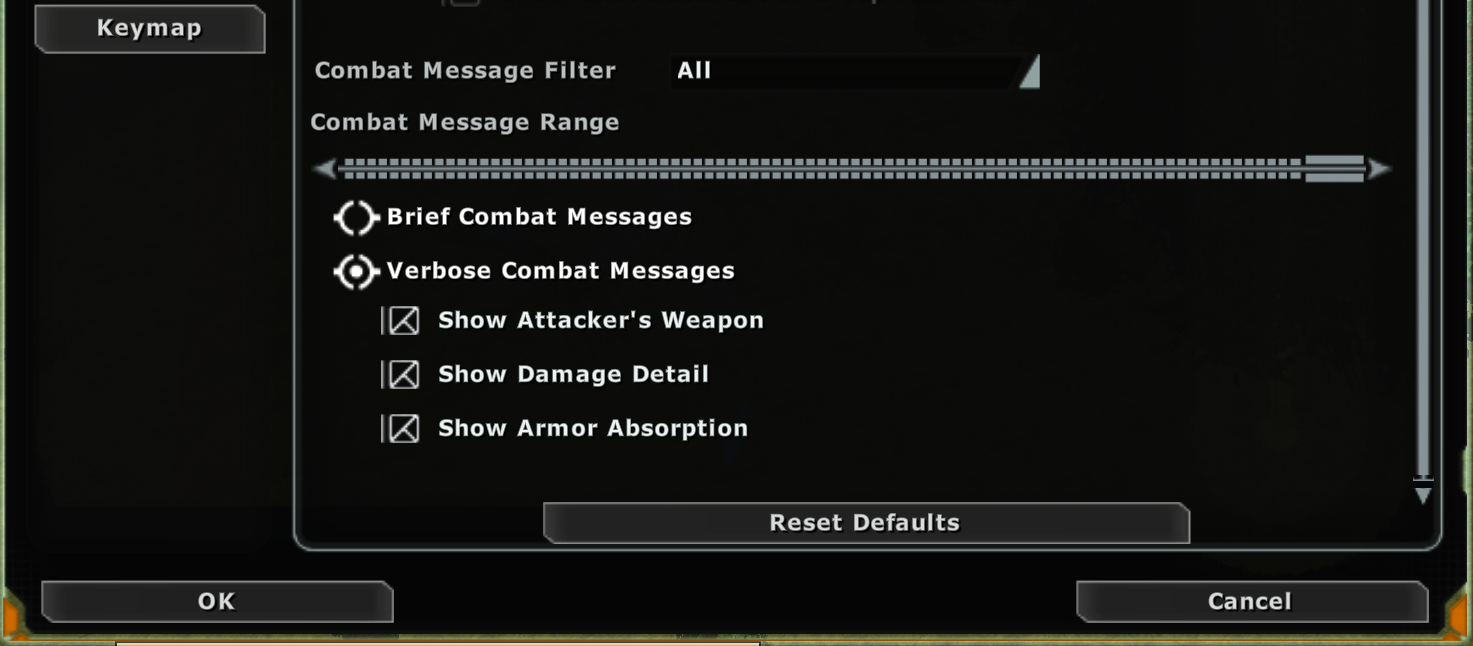
- Combat Message Filter: All. This is the one people miss. Anything else drops other players' hits from your log, so only you get a parse and speed runs can't see the whole group.
- Combat Message Range: all the way right. Fights spread out; a short range loses the far end of the room.
- Verbose Combat Messages with Show Attacker's Weapon, Show Damage Detail and Show Armor Absorption ticked. Verbose puts the ability name on every hit; Brief works but every basic attack becomes a nameless hit and the breakdowns are worse.
- Chat timestamps on. Without a time on each line the site can still total damage, but there is no duration, so no DPS, no timeline, and no rankings.
Click OK. These stick per character, so do it on every toon you log with.
2. Start logging
- Type /logchat in the chat box. The game answers
Chat logging ONand starts writing every chat line to a file. - Do it before you enter the instance. The site times a speed run from the first pull, so anything that happened before logging started is gone.
- It stays on until you log out or type /logchat again. A macro with just that command on your toolbar is the easy way to make it a habit.
The file is in your game folder: profiles\<account>\<server>\<number>_chatlog.txt. One file per character, and every session appends to it, so it keeps growing. Upload it as-is; the site finds the fights. If you want a clean file per night, delete or rename it before you /logchat.
Using the swglogs desktop meter instead? Upload its combat-log.jsonl. It already has real timestamps and needs none of the above.
3. Upload
- Log in with Discord from the top right. Uploads need an account so a bad parse can be traced; Discord only tells us your username.
- On the front page, pick the file, choose your server, and upload.
- Who is "You" is optional. The game writes your own actions as "You"; the site normally works out who that is from the top damage dealer. If you healed and someone else did the damage, put your character name here so your lines land on you.
- Visibility. Public shows on the front page and ranks. Unlisted is off the front page and never ranks, but anyone with the link can read it. Private is only for you and never ranks. You can change it later from My logs.
The report page appears while it parses, usually a few seconds. Uploading the same file twice just takes you to the existing report and doesn't count against your daily limit.
Something's off?
- No DPS, only totals: chat timestamps were off. Turn them on; the next log will have them.
- Only you have a parse: Combat Message Filter wasn't set to All, or the range slider was low.
- Abilities show as the weapon name: Brief instead of Verbose. Fine for totals, worse for breakdowns.
- Speed run missing: the site needs every boss of the instance in one log, with logging on from before the first pull. A log that starts mid-run isn't a clear.
- Under review: a number tripped a plausibility check. An admin looks at it; nothing is deleted.